In this section you will find relevant information about latest developments at Folder Scout Labs. We are happy to share with you the latest information about new releases.
Find below information about the new features included in Folder Scout Version 1.3.
|
Folder Scout 1.3: New Features |
Folder Scout 1.3 includes a completely new architecture that dramatically improves performance on networked environments like Offices, Company Branches, Corporative WANs, etc.
This new architecture is based on the fact that one PC (Server PC) shares its Folder Catalogs with other PCs (Clients PCs) in the LAN/WAN. That is what we call Server Shared Catalogs or more simply, from a Client PC point of view, Remote Catalogs.
NOTE: Remote catalogs feature only available in Professional Edition.
Folder Scout 1.3: Comparing Performance with Folder Scout 1.2 |
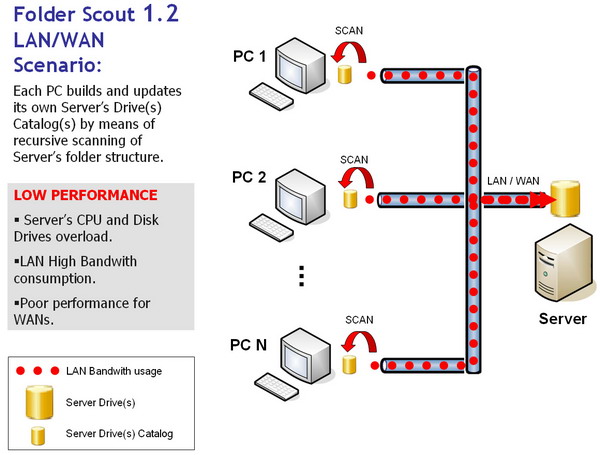
 Folder Scout 1.2 was based on a private catalog solution, so every PC in the LAN/WAN creates and updates it's own folder catalog by scanning Server PC drives. This results in múltiple request from each Client PC to the Server PC. See image below for a quick view of Folder Scout 1.2 architecture: Folder Scout 1.2 was based on a private catalog solution, so every PC in the LAN/WAN creates and updates it's own folder catalog by scanning Server PC drives. This results in múltiple request from each Client PC to the Server PC. See image below for a quick view of Folder Scout 1.2 architecture:
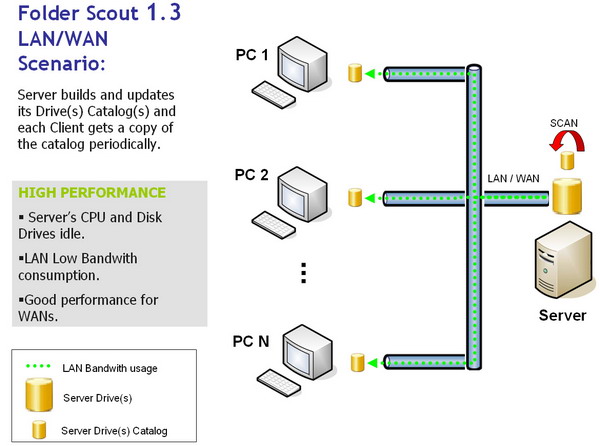
Folder Scout 1.3 is based on shared catalog solution, so there is no need of scanning Server PC drives. In this approach, every Client PC in the LAN/WAN gets a copy of the catalog created by Server PC. See image below for a quick view of Folder Scout 1.3 architecture:
|
|
 |
|



